

The first OperationOutcome a developer encounters usually arrives at the worst moment. A validation failed, a write got rejected, a search returned something strange, and the response body is a JSON structure the caller has not read before. Making sense of it in the first minute rather than the first hour is worth the small investment of learning its shape. The site's OperationOutcome reader is the tool for the paste-in walkthrough. For the wider setting, clinical FHIR resources and guides collects supporting material.
The Shape of OperationOutcome
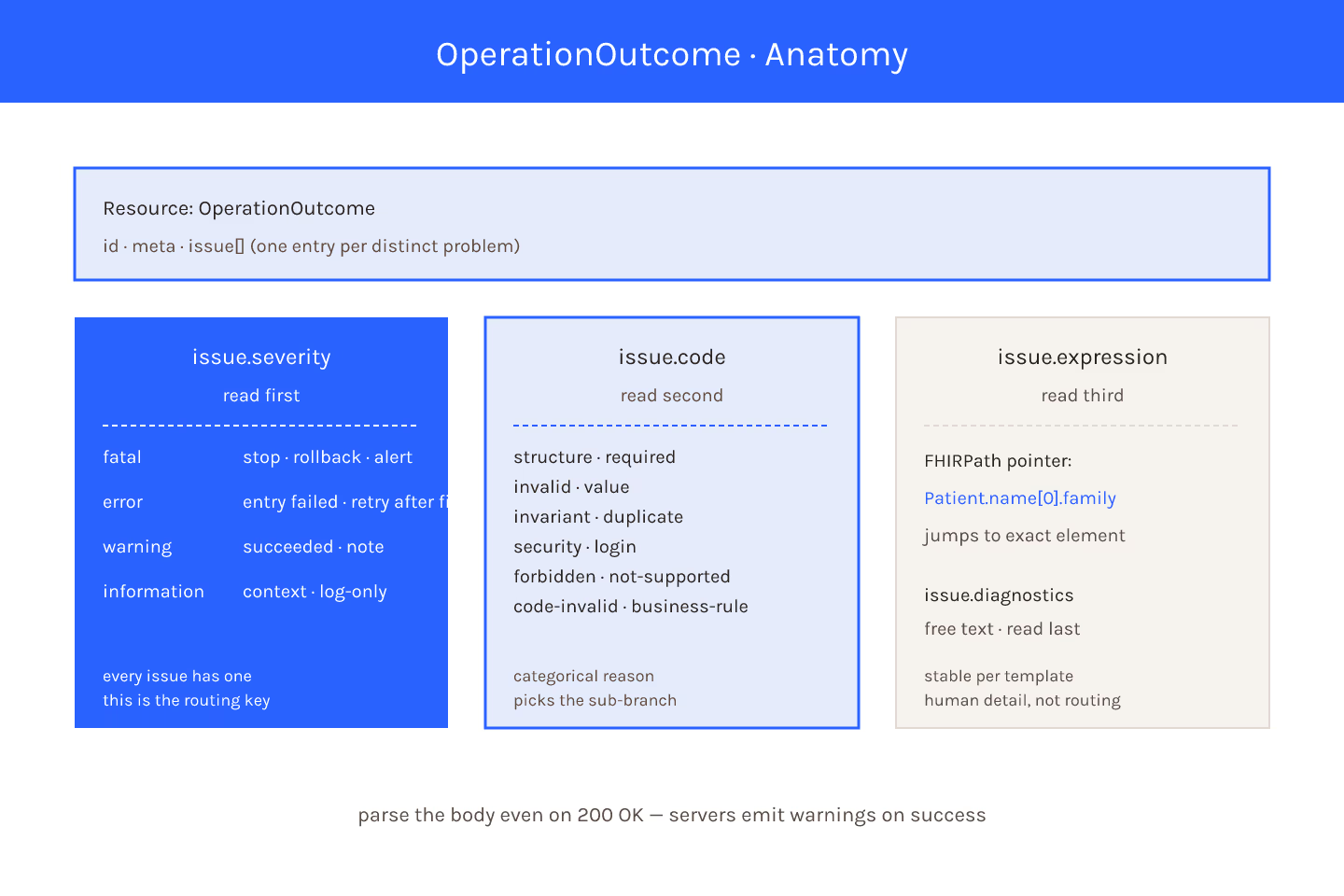
Every OperationOutcome carries an issue array. Each entry inside carries:
severity— fatal, error, warning, informationcode— the categorical reason (invalid, structure, required, etc.)details— a CodeableConcept with a text hint and optional codediagnostics— free-text explanation for humanslocation— pointers into the resource path (deprecated in newer versions)expression— FHIRPath pointers to the offending element (preferred)
Everything else is metadata. The shape is small and consistent, and once you have it in memory the rest is vocabulary.
Read Severity First
Severity is the first-order sort key. Fatal means the operation stopped and nothing succeeded. Error means the specific entry failed but the operation may have partial results. Warning means the operation completed and something worth noting was flagged. Information means the operation completed with a note that is neither warning nor failure.
Do not read every issue at the same priority. A response with fifteen warnings and one error is dominated by the error. For the mechanic, severity vs diagnostic details: which one drives your next step walks through the routing.
Then Read code
The code field categorises the reason. Common ones:
structure— the resource does not conform to the base spec's structurerequired— a required element is missinginvalid— a value violates a constraintcode-invalid— a coded value is not in the bound value setbusiness-rule— a domain rule beyond structural validation failednot-supported— the operation is not supported on this serverduplicate— a uniqueness constraint firedsecurity— the operation was rejected on authorization grounds
Each code implies a different fix. For the enumeration, issue.code vocabulary and what it actually means covers each entry with an example.
Then Read expression
expression is a FHIRPath pointer at the offending element. Patient.name[0].family is precise; a caller can jump straight to the exact field. Older responses use location with dot-path segments — same idea, older syntax.
If a validator flags an element deep in a Bundle, the expression is what tells you which entry. Without it, you would have to guess. For the split, location vs expression: pointing at the offending element is the entry.
Ignore diagnostics Until You Need It
diagnostics is free text. It is what a support engineer would want to read. It is often verbose and often inconsistent across servers. Read severity + code + expression first; consult diagnostics only when the first three are not enough.
The 200 With Warnings Case
An OperationOutcome does not only accompany failures. A successful write can return 200 with an OperationOutcome that has warning-severity issues. Clients that dispatch purely on HTTP status miss those. Always parse the body when the response is FHIR-shaped.
The Reader
The paste-in reader at /diagnostics/read-outcome-payload/ groups issues by severity and code, resolves expression pointers if a sample resource is provided, and flags common patterns. It is the fast path from "a wall of JSON" to "here is what to fix".
What To Do Next
- Fatal or error — fix the payload and retry
- Warning — decide whether to fix or accept
- Information — usually log-only
Every OperationOutcome is triageable in under a minute once the shape is familiar. For the deeper reading, the enumeration of codes and the mechanics of alerts vs logs are next.
Sources
- HL7 canonical FHIR OperationOutcome resource specification - HL7 canonical FHIR OperationOutcome resource specification, evergreen reference